You configured a material and it works in CU50 (or PMEVC in S/4HANA). Now a sales order needs to trigger production. What happens next?
Make-to-Order (MTO) with Variant Configuration is the most common production scenario for configurable materials. The customer order drives both the configuration and the manufacturing: no stock, no forecast, a configured product built to order.
This guide walks through the full process step by step, with the transactions and configuration settings you need at each stage.
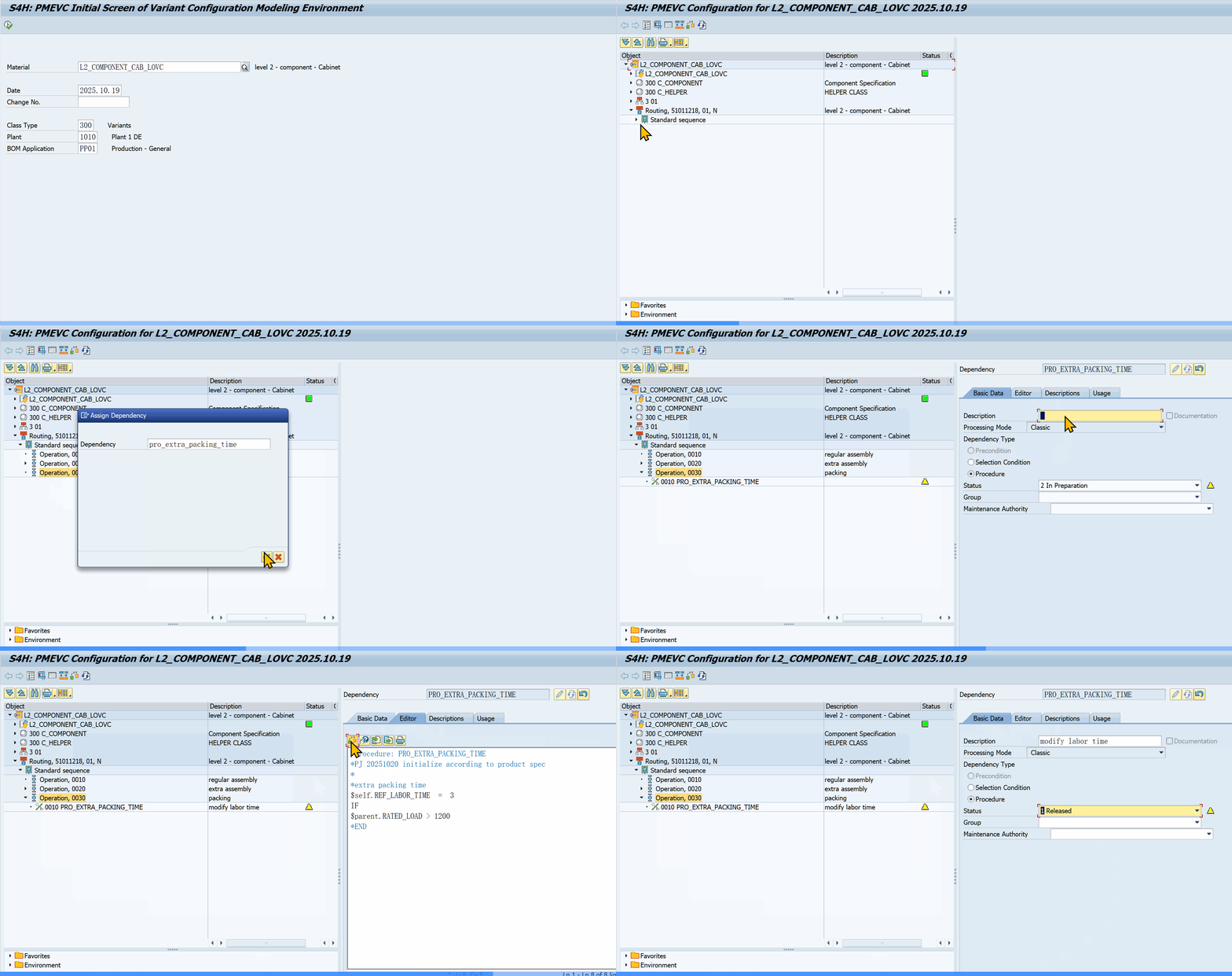 PMEVC: defining a procedure that modifies routing standard values based on configuration
Sources: MM02 (material master — strategy group 25) | CU41 (configuration profile) | VA01/VA02 (sales order with configurable materials)
Process Overview
VA01 (Sales Order + Config)
  → MD04 (Stock/Requirements List)
  → MD50 (Planned Order)
  → CO02 (Production Order)
  → CO11N (Confirmation)
  → KO88 (Settlement)
  → VL01N (Delivery)
  → VF01 (Billing)
The flow moves from SD to PP to CO and back to SD. Each step relies on settings you create during modeling.
1. Prerequisites
Before the process works, your configurable material needs these settings:
| Area | Setting | Transaction |
|---|---|---|
| Material Type | KMAT (or FERT with configurable indicator) | OMS2 / MM01 |
| Item Category Group | 0002 (for standard), 0004 (for SET processing) | MM02 |
| Procurement Type | E (In-house production) | MM02 (MRP 2 view) |
| Strategy Group | 25 (MTO for configurable materials) | MM02 (MRP 3 view) |
| Availability Check | 02 (Individual requirements) | MM02 (MRP 3 view) |
| Class Assignment | Variant class (type 300) | MM02 (Classification view) |
| Config Profile | Created with processing form | CU41 (or PMEVC in S/4HANA) |
Strategy Group 25 uses requirement type KEK (make-to-order configurable material) and requirements class 046. This ensures the sales order creates a separate planning segment: no consumption of forecast, no make-to-stock logic.
2. Sales Order Creation (VA01)
When you create a sales order for a configurable material:
- Enter the KMAT material in VA01
- Item category TAN is determined automatically (for standard configurable materials)
- The system pops the configuration screen automatically
- Configure by selecting characteristic values
- Surcharges from variant conditions appear in pricing
- System shows Material Availability Date based on configured components
Key fields determined by material master settings:
- Item category TAN uses configuration profile from the material's class
- Requirement type KEK activates MRP-relevant planning
- BOM explosion level depends on the configuration profile processing form
3. Configuration Profile Processing Forms
The configuration profile determines how BOM components behave during the sales process. Choose the right form during profile creation (CU41).
| Processing Form | When to Use | BOM Behavior |
|---|---|---|
| Planned/Prod Order (No Explosion) | Only header material is configured in SD. Components determined later in production. | No sub-items in sales order. Basic MRP planning. |
| Sales Order (SET) | Individual components are sold and priced separately. | Sales-relevant components appear as sub-items. Pricing and requirement transfer at component level. |
| Order BOM | Customer-specific BOM changes are needed. | Sales order creates its own BOM variant. Manual add/delete of items allowed. |
Planned/Production Order (No Explosion): The simplest form. Only the header material ($ROOT) can be configured. The BOM is not relevant to the sales order, so components are determined during MRP or production order creation. Use this when components are manufacturing details, not sales items.
Sales Order (SET Processing): Components become individual order items. Item category group 0004 at the configurable material level enables this. Pricing and requirement transfer happen at each component line, not the header. Common for products where customers choose individual parts (a PC with choices for monitor, CPU, keyboard).
Order BOM: The system creates a order-specific BOM from the super BOM. The user can add, delete, or replace items manually. Two sub-types:
- Result-oriented: Only the final BOM structure is saved
- Knowledge-based: The super BOM, all manual changes, and dependencies are preserved
4. MRP and Planned Orders (MD04 / MD50)
After saving the sales order:
- Run MD04 (Stock/Requirements List) to see the sales order as a planning segment
- The requirement is displayed with the Material Availability Date from the sales order
- Run MD50 (Planned Order for Sales Order) to convert the sales order requirement into a planned order
The planned order is the first step toward shop floor scheduling. It carries the configuration from the sales order, so the planned order knows which components and operations are needed.
BOM explosion during MRP: The system now evaluates selection conditions on BOM items. Only components satisfying the $parent.<CHAR> = '<VALUE>' conditions appear in the planned order BOM.
5. Production Order (CO02)
Convert the planned order into a production order:
- CO02 (Change Production Order): create with reference to the planned order
- The production order inherits the configuration
- BOM selection conditions determine which materials are needed Routing selection conditions determine which operations apply
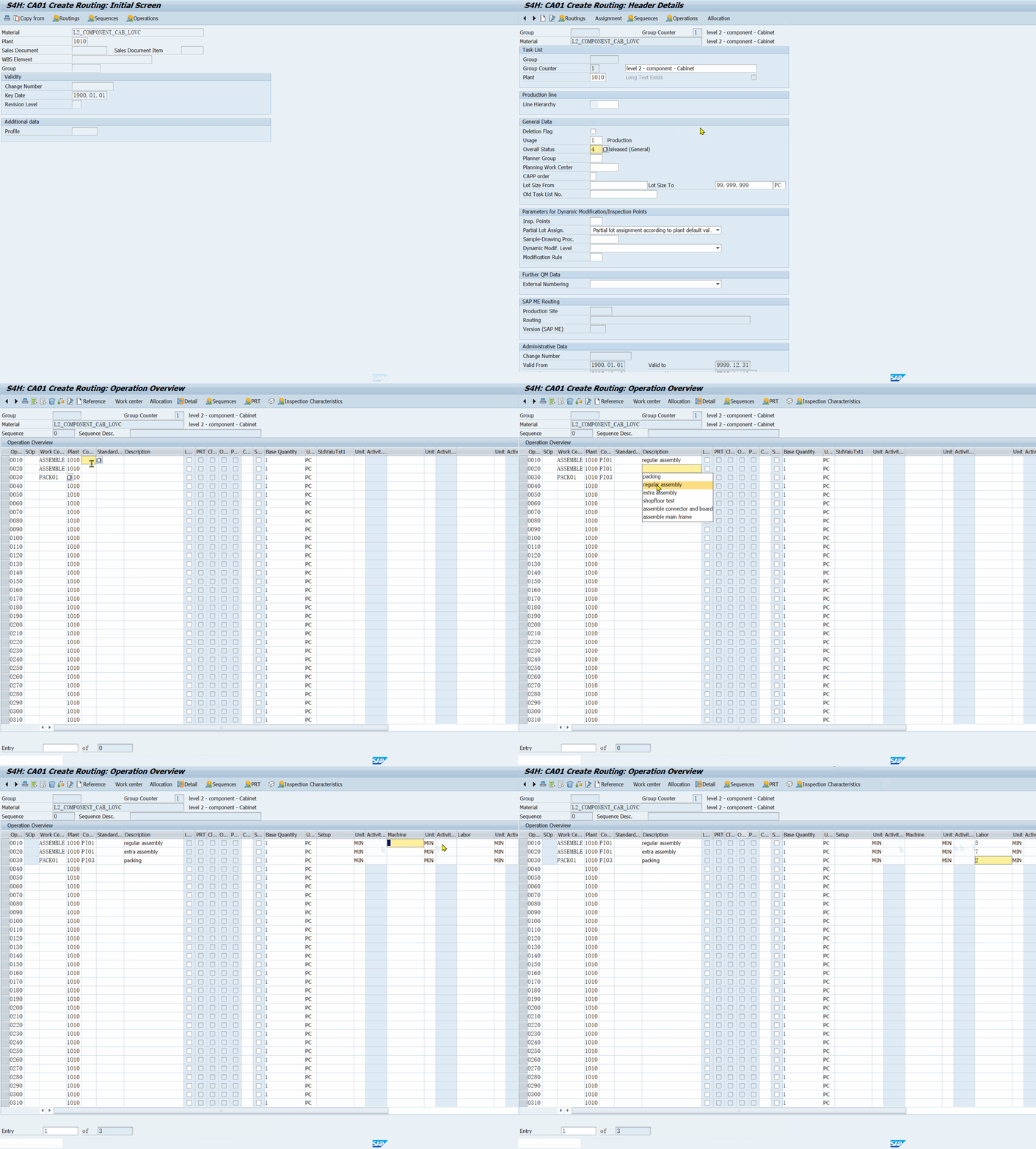 SAP transaction CA01: routing with selection conditions for VC
5. Prior to release, no confirmations can be entered
SAP transaction CA01: routing with selection conditions for VC
5. Prior to release, no confirmations can be entered
Before release, check:
- Component quantities (modified by procedures or actions)
- Operation standard values (setup time, labor time changed by dependencies)
- Planned costs (Go to → Costs → Analysis)
Release the order. This enables confirmations and goods movements.
Material withdrawal during production: Components are picked and issued to the production order. Backflushing posts components automatically when operations are confirmed (CO11N).
6. Confirmation (CO11N)
Use CO11N (Enter Time Ticket) to confirm operations:
- Enter the production order and operation number
- Enter actual execution time, quantity, and scrap
- System posts goods movements (backflushing of components)
- Finished product is stored to sales order stock
- Actual costs are calculated
Correction: If goods movement errors occur, check COGI (Automatic Goods Movement).
Technical completion: To close the order without yielding a product, use CO02 → Functions → Restrict Processing → Technical Completion.
7. Settlement (KO88)
Settlement transfers production order costs to the sales order:
- KO88 (Individual Settlement)
- The production order is settled to the sales order item (cost object)
- Analyze current costs using CO03 (Display Production Order) → Costs → Analysis
The settlement profile is controlled by the requirements class (046). This ties the production cost back to the customer order for profitability analysis.
8. Delivery and PGI (VL01N / VL10G)
- VL10G (Delivery Due List): find the sales order ready for delivery
- VL01N (Create Single Delivery): create outbound delivery
- Assign serial number to the material (if serial number profile is configured)
- Pick and Post Goods Issue: movement type 601 E (delivery from sales order stock)
- Accounting document is generated
9. Billing (VF01)
- VF04 (Billing Due List) or VF01 (Create Single Invoice)
- The invoice includes variant condition surcharges from the configuration
- F-28 (Customer Payment): receive payment
Material Variants vs. MTO
Material variants are pre-configured materials linked to a configurable material. They allow make-to-stock for common configurations.
In the sales order, when the configured values match a material variant:
- The system offers to replace the configurable material with the variant
- Item category changes to TAN (configured variant)
- Pricing reflects the variant's standard price instead of calculated VC pricing
Use material variants when certain configurations account for 80%+ of orders. Keep pure MTO for the long tail.
Reference Characteristics: What Dependencies Can Change
During this process, dependencies can modify values in the sales order and production documents. These are controlled through reference characteristics.
Write access (dependencies can change these fields):
| Structure | Fields |
|---|---|
| VCSD_UPDATE | BRGEW (gross weight), NTGEW (net weight), GEWEI (weight unit), VOLUM (volume), VOLEH (volume unit), KWMENG (item qty), VRKME (sales unit), ZMENG (target qty), ZIEME (target qty unit), ARKTX (article description) |
| STPO | MENGE (component qty), POTX1/2 (item text), ROMS1-3 (variable-size sizes), ROANZ (variable-size count), ROMEN (variable-size qty) |
| PLPOD | LAR01-06 (activity types), VGW01-06 (standard values), VGE01-06 (unit of measure), ARBPL (work center), LTXA1/2 (operation descriptions) |
Read access (dependencies can read these fields): VBAK, VBAP, VBKD, VBPA_AG, VBPA_WE, VBPA_RE, VBPA_RG, VEDA, MAEPV, MAAPV.
Variant condition keys: To write surcharges from configuration, create a reference characteristic pointing to SDCOM-VKOND. The dependency sets a value on this characteristic, and condition type VA00 picks it up in pricing. For the full setup guide — reference characteristic creation, V/06 condition records, SAP_PRICING dependency group — see the dedicated guide: VC Pricing Setup Guide.
Common Pitfalls
- Wrong item category: Ensure item category group 0002 or 0004 on the material master. Item category TAN is standard for configurable materials.
- MRP not firing: Check strategy group 25 is set in MRP 3 view. Without it, the sales order creates no planning segment.
- BOM items missing in production order: Check selection conditions on components. A typo in
$parent.CHARprevents the component from appearing. - Pricing not showing surcharges: Verify the reference characteristic points to SDCOM-VKOND and condition type VA00 is set up.
- Material variant not replacing: The variant class must match exactly. The system checks all values assigned to the configurable material's class.
Key Transactions Reference
| Transaction | Purpose |
|---|---|
| VA01 | Create sales order |
| MD04 | Stock / Requirements List |
| MD50 | Create planned order for sales order |
| CO02 | Change production order |
| CO11N | Confirm production order |
| KO88 | Settle production order |
| VL01N / VL10G | Create delivery / Delivery due list |
| VF01 / VF04 | Create invoice / Billing due list |
| MM02 | Change material master (strategy group, class) |
| CU41 | Create configuration profile |
| CS02 | Change BOM (assign dependencies) |
MTO with VC is a well-trodden path in SAP. The key is getting the prerequisites right: once the material master, config profile, and strategy group are aligned, the process runs from VA01 through to KO88 with minimal manual intervention. Most problems trace back to missing settings in the material master or configuration profile.
Comments & Danmaku
Leave a comment — it flies across the page as danmaku!